Amae Marks
Save inspiration from anywhere, and keep where it came from
Marks is where your references live: pages, images, quotes and posts, saved in a click and sorted by project.
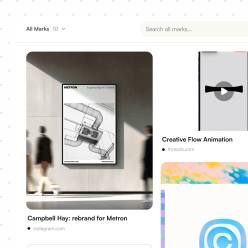
What you can do
- Save from Chrome with the Amae extension, or from any app with the iOS share sheet
- The link, author, selected text and images come along with it
- Browse a project as a moodboard, a grid or a list
More in Marks
Projects and tags
Group Marks by client, launch or idea, and tag them your own way.
Filters
Narrow a library by type, tag, project or whether you have read it yet.
Find it by what is in itPro
Amae looks at saved images and adds tags, so you can search for what a reference shows, not just its title.
Instagram in fullPro
Posts, carousels and Reels are saved with their images and video, not just a link.
Questions
How do I save a Mark?
Use the Amae extension in Chrome on your computer, or the share sheet in any app on iPhone. You can also add a link straight in Amae.
How many Marks can I save for free?
Up to 50 on the free plan. Pro (99 kr/month) has no limit.
Can I save Instagram posts and Reels?
Yes. On Pro, Amae keeps the images and video of posts, carousels and Reels, so they are still there if the original changes.
Is Amae a moodboard app?
It includes one: any project can be viewed as a moodboard. The difference is that your references sit next to the notes and tasks they turn into.